
Transparent Background: How to Make an Image Background Transparent

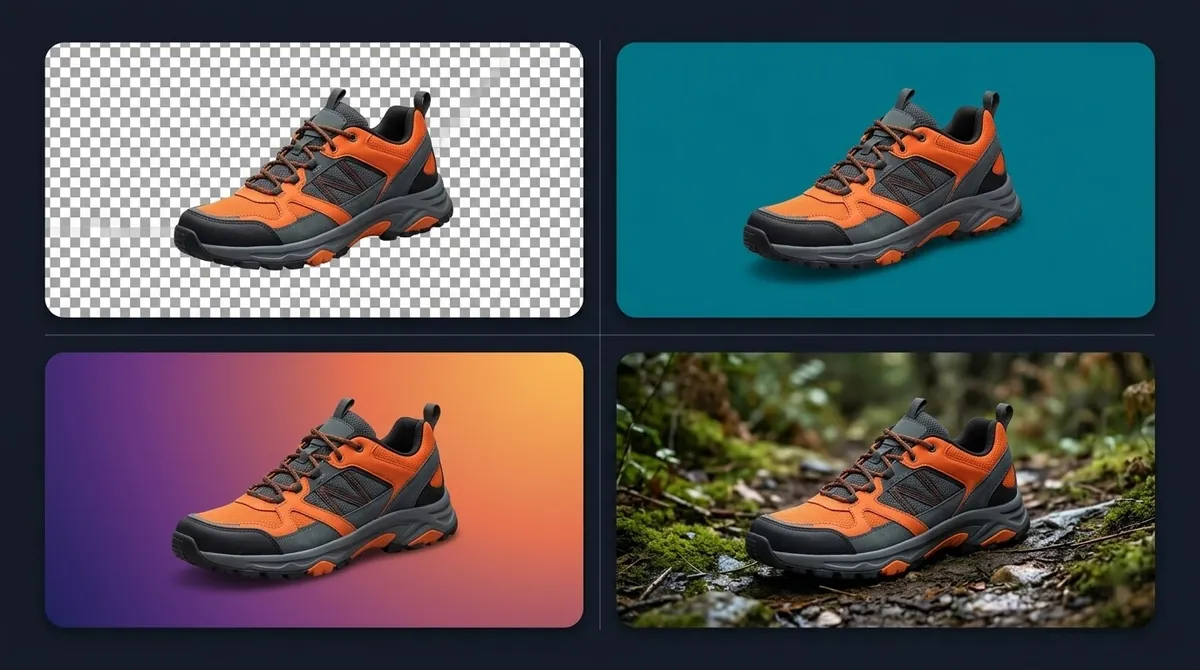
A transparent background means the pixels around your subject are empty, so whatever is behind the image shows through. It is how logos sit cleanly on a coloured web page and how a product photo can be dropped onto any backdrop.
How transparency is stored
Transparent images carry an extra alpha channel alongside red, green and blue. Each pixel has an alpha value from fully opaque to fully transparent. Values in between give soft, anti-aliased edges and semi-transparent areas such as shadows.
You may see a grey-and-white checkerboard in an editor. That is only a visual convention meaning "nothing here". It is not part of the image.
Which formats support transparency
| Format | Transparency | Notes |
|---|---|---|
| PNG | Yes, full alpha | The standard for cutouts; lossless |
| WebP | Yes, full alpha | Smaller files; widely supported in modern browsers |
| AVIF | Yes | Very small files; newer support |
| SVG | Yes | Vector graphics, not photos |
| GIF | Single-colour only | Edges look jagged |
| JPEG | No | Transparent areas become a solid colour |
See PNG vs JPG for transparent images for when each makes sense.
How to make a background transparent
- Remove the background. Use an AI background remover, a built-in feature or a manual selection. See remove background.
- Check the edges on a dark and a light background for halos.
- Export as PNG or WebP, not JPEG.
- Test it by placing it on a coloured background. If you see a solid box, transparency was lost.
Common problems
A white box around the subject. The image was saved in a format without alpha, or the "transparent" background is actually painted white. Re-export as PNG.
A white or dark outline (halo). Leftover edge pixels from the old background. Use matting or a slight edge contraction, and check the cutout against the colour it will sit on.
Jagged edges. The mask was binary rather than soft. Use a tool with matting or feathering, and avoid resizing a small cutout up.
Transparent areas turn black. Some software shows empty pixels as black. Test in the app or website where you will actually use the file.
Where transparent images are used
- Logos and icons on websites
- Product images placed on different backdrops
- Overlays in video and slide decks
- Stickers and print-on-demand designs
BG Remover Pro, our Mac app, removes backgrounds and exports PNG with transparency (or WebP), and can fill with a solid colour or your own backdrop instead.
Frequently asked questions
How do I make a background transparent?
Remove the background with an editor or an AI tool and save as PNG or WebP. Both keep the transparent pixels.
Why does my transparent PNG have a white background?
The viewer may display it on white, the background may be filled with white pixels, or the file was saved without alpha. Test on a coloured background.
Can a JPG have a transparent background?
No. JPEG has no alpha channel, so transparent areas become a solid colour, usually white.
What is the best format for a transparent logo?
SVG if you have a vector file; otherwise PNG, or WebP for smaller files.

Need to do this for a whole folder?
BG Remover Pro is the Mac app we make. It removes backgrounds in bulk, on your Mac, with nothing uploaded, and you can try 20 images free. See pricing or what it does.